
项目一理化生项目复盘
2025年5月1日大约 6 分钟约 1679 字
[TOC]
一、项目分析
| item | 描述 | 其他 |
|---|---|---|
| 背景 | 1.学生们要进行理化生考试 2.老师要对理化生考试的前、中、后期做准备,线下没那么方便 将上面的两种场景改为线上的 | |
| 功能 | 1.对学生而言:可以在线考试、补考、对考试进行自评等操作 2.对老师而言:设置考卷、考场、监考、阅卷、评分等操作 3.对于学校而言:对老师、学生、教师的数量、出入、配置进行管理 | |
| 竞争力分析 | 1.该项目比较吃销售,先讲故事,讲好故事之后能营销出去大概率就能做出来 2.市面上已经有很多个同类产品了,我们做出来的产品显得竞争力不是很足 | |
| 项目难度 | 总分五颗星,开发难度2颗星;从0搭建的话4颗星。不难的主要原因是因为所有的实现都能找到例子,如果在没有例子的情况下,难度能上升到3颗星 |
二、技术栈
主要技术栈
| 技术 | 作用 | 备注 |
|---|---|---|
| ruoyi管理系统 | ||
| vue2 | 单页面开发 | |
| pnpm | 用于包管理 | |
| monorepo | 用于管理多个项目 提高方法、配置的可复用性能 | 这个的搭建过程自己还不是很会 |
| axios | 更多的是使用request和response进行网络请求和响应 | 1.如何进一步封装我是不太会 |
| eslint | 用于代码扫描和检测 | |
| less/sass | css模块化工具 | |
| vuex | 用于状态管理 | |
| vue-router | 用于路由跳转 | |
| echarts | 用于表格设计 |
pakage.js中能体现所有的使用的技术,详情可看:
'{
"name": "vue-antd-pro",
"version": "3.0.2",
"private": true,
"scripts": {
"serve": "vue-cli-service serve:prehandle",
"build": "vue-cli-service build",
"test:unit": "vue-cli-service test:unit",
"lint": "vue-cli-service lint",
"build:preview": "vue-cli-service build --mode preview",
"lint:nofix": "vue-cli-service lint --no-fix",
"deploy": "node deploy/deploy.js",
"ci": "node deploy/auto-ci.js"
},
"vuePlugins": {
"service": [
"serve.prehandle.js"
]
},
"dependencies": {
"@ant-design-vue/pro-layout": "^1.0.8",
"@antv/data-set": "^0.10.2",
"@fullcalendar/core": "^5.10.1",
"@fullcalendar/daygrid": "^5.10.1",
"@fullcalendar/interaction": "^5.10.1",
"@fullcalendar/timegrid": "^5.10.1",
"@fullcalendar/vue": "^5.10.1",
"@riophae/vue-treeselect": "0.4.0",
"@wangeditor/editor": "^5.1.23",
"@wangeditor/editor-for-vue": "^1.0.2",
"ant-design-vue": "^1.7.6",
"axios": ">=0.21.1",
"chinese-lunar-calendar": "^1.0.1",
"core-js": "^3.26.0",
"echarts": "^5.3.1",
"enquire.js": "^2.1.6",
"html2canvas": "^1.4.1",
"jspdf": "^2.5.1",
"jszip": "^3.10.1",
"lodash.clonedeep": "^4.5.0",
"lodash.get": "^4.4.2",
"lodash.pick": "^4.4.0",
"md5": "^2.2.1",
"mockjs2": "1.0.8",
"moment": "^2.24.0",
"nprogress": "^0.2.0",
"pixi.js": "^7.2.4",
"store": "^2.0.12",
"terser-webpack-plugin": "4",
"vconsole": "^3.15.1",
"video.js": "^7.18.1",
"videojs-contrib-hls": "^5.15.0",
"videojs-markers": "^1.0.1",
"viser-vue": "^2.4.6",
"vue": "^2.6.14",
"vue-clipboard2": "^0.2.1",
"vue-cropper": "0.4.9",
"vue-i18n": "^8.17.4",
"vue-print-nb": "^1.7.5",
"vue-quill-editor": "^3.0.6",
"vue-router": "^3.5.2",
"vue-svg-component-runtime": "^1.0.1",
"vuex": "^3.1.1"
},
"devDependencies": {
"@ant-design/colors": "^3.2.1",
"@babel/preset-modules": "^0.1.6",
"@vue/cli-plugin-babel": "^4.0.4",
"@vue/cli-plugin-eslint": "^4.0.4",
"@vue/cli-plugin-router": "^4.0.4",
"@vue/cli-plugin-unit-jest": "^4.0.4",
"@vue/cli-plugin-vuex": "^4.0.4",
"@vue/cli-service": "^4.0.4",
"@vue/eslint-config-standard": "^4.0.0",
"@vue/test-utils": "^1.0.0-beta.29",
"archiver": "^5.3.1",
"babel-eslint": "^10.0.1",
"babel-plugin-import": "^1.12.2",
"babel-plugin-transform-remove-console": "^6.9.4",
"eslint": "^5.16.0",
"eslint-plugin-html": "^5.0.0",
"eslint-plugin-vue": "^5.2.3",
"git-revision-webpack-plugin": "^3.0.6",
"less": "^3.7.0",
"less-loader": "^5.0.0",
"node-ssh": "^13.0.1",
"sass": "1.32.13",
"sass-loader": "10.1.1",
"vue-svg-icon-loader": "^2.1.1",
"vue-template-compiler": "^2.6.14",
"webpack-bundle-analyzer": "^4.9.1",
"webpack-theme-color-replacer": "^1.3.12"
}
}'
"name": "vue-antd-pro",
"version": "3.0.2",
"private": true,
"scripts": {
"serve": "vue-cli-service serve:prehandle",
"build": "vue-cli-service build",
"test:unit": "vue-cli-service test:unit",
"lint": "vue-cli-service lint",
"build:preview": "vue-cli-service build --mode preview",
"lint:nofix": "vue-cli-service lint --no-fix",
"deploy": "node deploy/deploy.js",
"ci": "node deploy/auto-ci.js"
},
"vuePlugins": {
"service": [
"serve.prehandle.js"
]
},
"dependencies": {
"@ant-design-vue/pro-layout": "^1.0.8",
"@antv/data-set": "^0.10.2",
"@fullcalendar/core": "^5.10.1",
"@fullcalendar/daygrid": "^5.10.1",
"@fullcalendar/interaction": "^5.10.1",
"@fullcalendar/timegrid": "^5.10.1",
"@fullcalendar/vue": "^5.10.1",
"@riophae/vue-treeselect": "0.4.0",
"@wangeditor/editor": "^5.1.23",
"@wangeditor/editor-for-vue": "^1.0.2",
"ant-design-vue": "^1.7.6",
"axios": ">=0.21.1",
"chinese-lunar-calendar": "^1.0.1",
"core-js": "^3.26.0",
"echarts": "^5.3.1",
"enquire.js": "^2.1.6",
"html2canvas": "^1.4.1",
"jspdf": "^2.5.1",
"jszip": "^3.10.1",
"lodash.clonedeep": "^4.5.0",
"lodash.get": "^4.4.2",
"lodash.pick": "^4.4.0",
"md5": "^2.2.1",
"mockjs2": "1.0.8",
"moment": "^2.24.0",
"nprogress": "^0.2.0",
"pixi.js": "^7.2.4",
"store": "^2.0.12",
"terser-webpack-plugin": "4",
"vconsole": "^3.15.1",
"video.js": "^7.18.1",
"videojs-contrib-hls": "^5.15.0",
"videojs-markers": "^1.0.1",
"viser-vue": "^2.4.6",
"vue": "^2.6.14",
"vue-clipboard2": "^0.2.1",
"vue-cropper": "0.4.9",
"vue-i18n": "^8.17.4",
"vue-print-nb": "^1.7.5",
"vue-quill-editor": "^3.0.6",
"vue-router": "^3.5.2",
"vue-svg-component-runtime": "^1.0.1",
"vuex": "^3.1.1"
},
"devDependencies": {
"@ant-design/colors": "^3.2.1",
"@babel/preset-modules": "^0.1.6",
"@vue/cli-plugin-babel": "^4.0.4",
"@vue/cli-plugin-eslint": "^4.0.4",
"@vue/cli-plugin-router": "^4.0.4",
"@vue/cli-plugin-unit-jest": "^4.0.4",
"@vue/cli-plugin-vuex": "^4.0.4",
"@vue/cli-service": "^4.0.4",
"@vue/eslint-config-standard": "^4.0.0",
"@vue/test-utils": "^1.0.0-beta.29",
"archiver": "^5.3.1",
"babel-eslint": "^10.0.1",
"babel-plugin-import": "^1.12.2",
"babel-plugin-transform-remove-console": "^6.9.4",
"eslint": "^5.16.0",
"eslint-plugin-html": "^5.0.0",
"eslint-plugin-vue": "^5.2.3",
"git-revision-webpack-plugin": "^3.0.6",
"less": "^3.7.0",
"less-loader": "^5.0.0",
"node-ssh": "^13.0.1",
"sass": "1.32.13",
"sass-loader": "10.1.1",
"vue-svg-icon-loader": "^2.1.1",
"vue-template-compiler": "^2.6.14",
"webpack-bundle-analyzer": "^4.9.1",
"webpack-theme-color-replacer": "^1.3.12"
}
}'
三、其他分析
| 描述 | 其他 | |
|---|---|---|
| 人数 | 前端4人 | |
| 时间 | 20240402-20240430 | |
| 项目亮点 | 1.多个项目并行,使用monorepo进行多项目管理。提升了代码复用率 2.许多组件重复出现,进行共有组件、指令、方法的提取和复用 3.video.js按颜色进行视频打点 4.tts语音播报 | |
| 项目收获 | 1.熟练使用rouyi项目进行开发 | |
| 创新思路 | 1.实现一个页面的多次复用:抽取公用字段/html之类的 |
四、项目部分图例
例子1:课程表以及课程安排
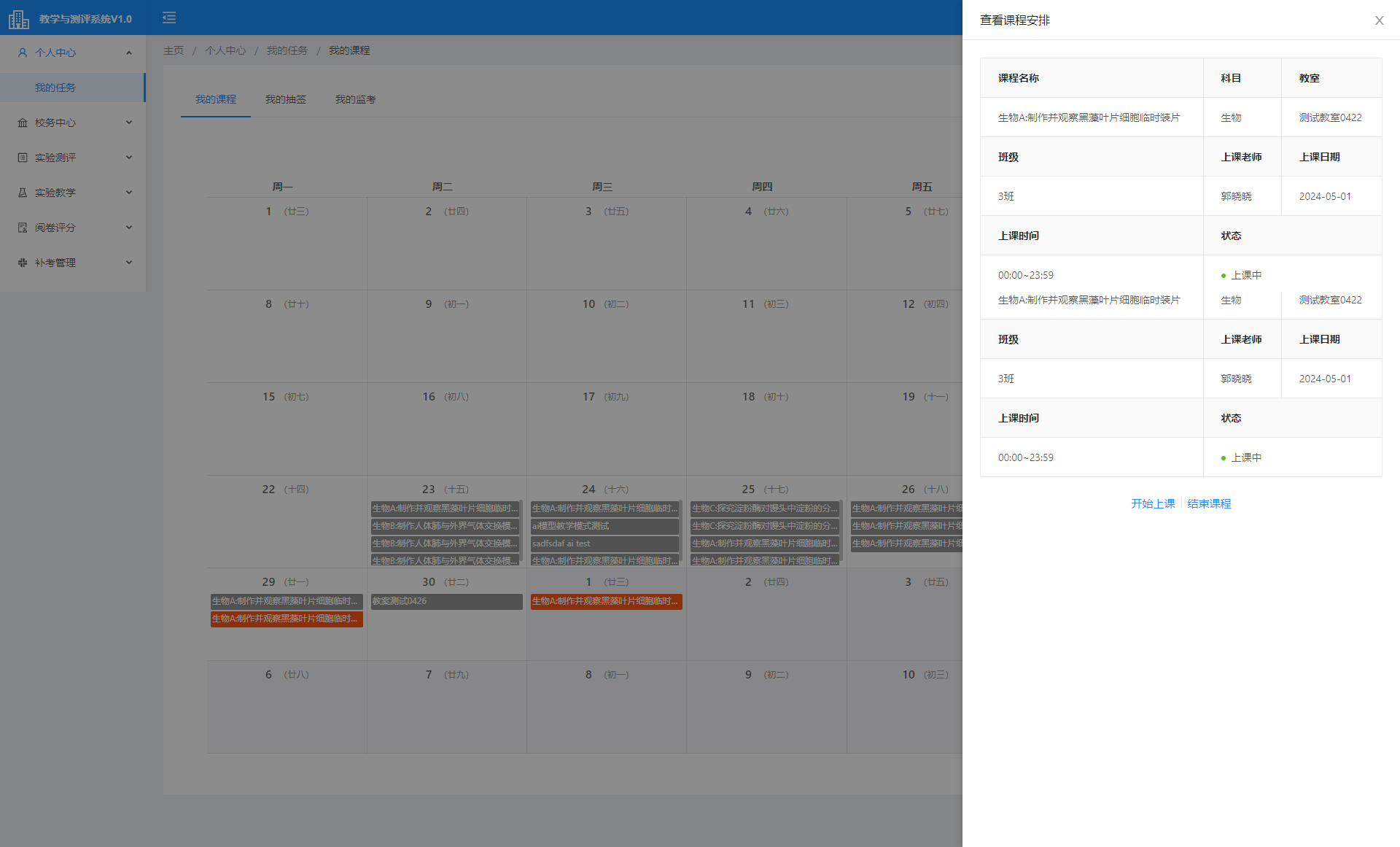
日历实现:<a-calendar>
抽屉实现:<a-drawer>
表格实现:<a-descriptions> + <a-descriptions-item> 去实现右侧表格
路由实现:
        <a-card :bordered="false">
      <a-menu mode="horizontal" :selectedKeys="selectedKeys" type="inner">
        <a-menu-item key="/academic/task/myClassSchedule">
          <router-link :to="{ name: 'taskMyClassSchedule' }"> 我的课程 </router-link>
        </a-menu-item>
        <a-menu-item key="/academic/task/drawMgt">
          <router-link :to="{ name: 'taskDrawMgt' }"> 我的抽签 </router-link>
        </a-menu-item>
        <a-menu-item key="/academic/task/invigilationMgt">
          <router-link :to="{ name: 'taskInvigilationMgt' }"> 我的监考 </router-link>
        </a-menu-item>
      </a-menu>
      <div class="account-settings-info">
        <route-view></route-view>
      </div>
    </a-card>
例子2:点击对应的颜色评分块儿,跳转到对应进度条
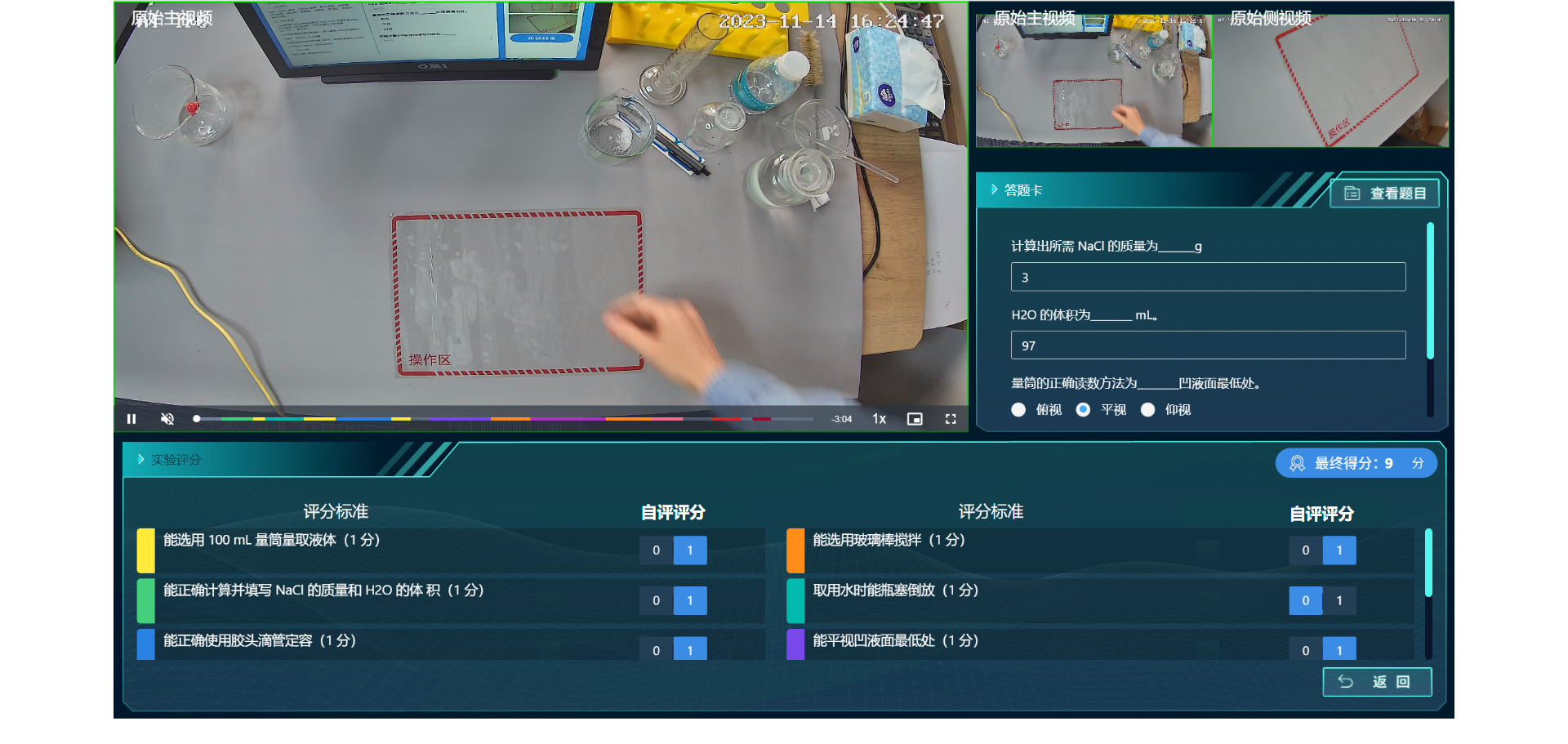
功能难点:
1.将进度条上面的颜色和评分标准对应起来,用户点击评分标准的时候能够跳转到对应的进度条条上面去
实现:
- 用video.js框架去实现的视频播放,将video播放抽象成单独的路由
- 将需要的参数配置通过props传递到子路由,videojs-markers实现视频打点。使用方法
- 父组件接收后端传递的数据并进行处理,增加点击时的处理逻辑
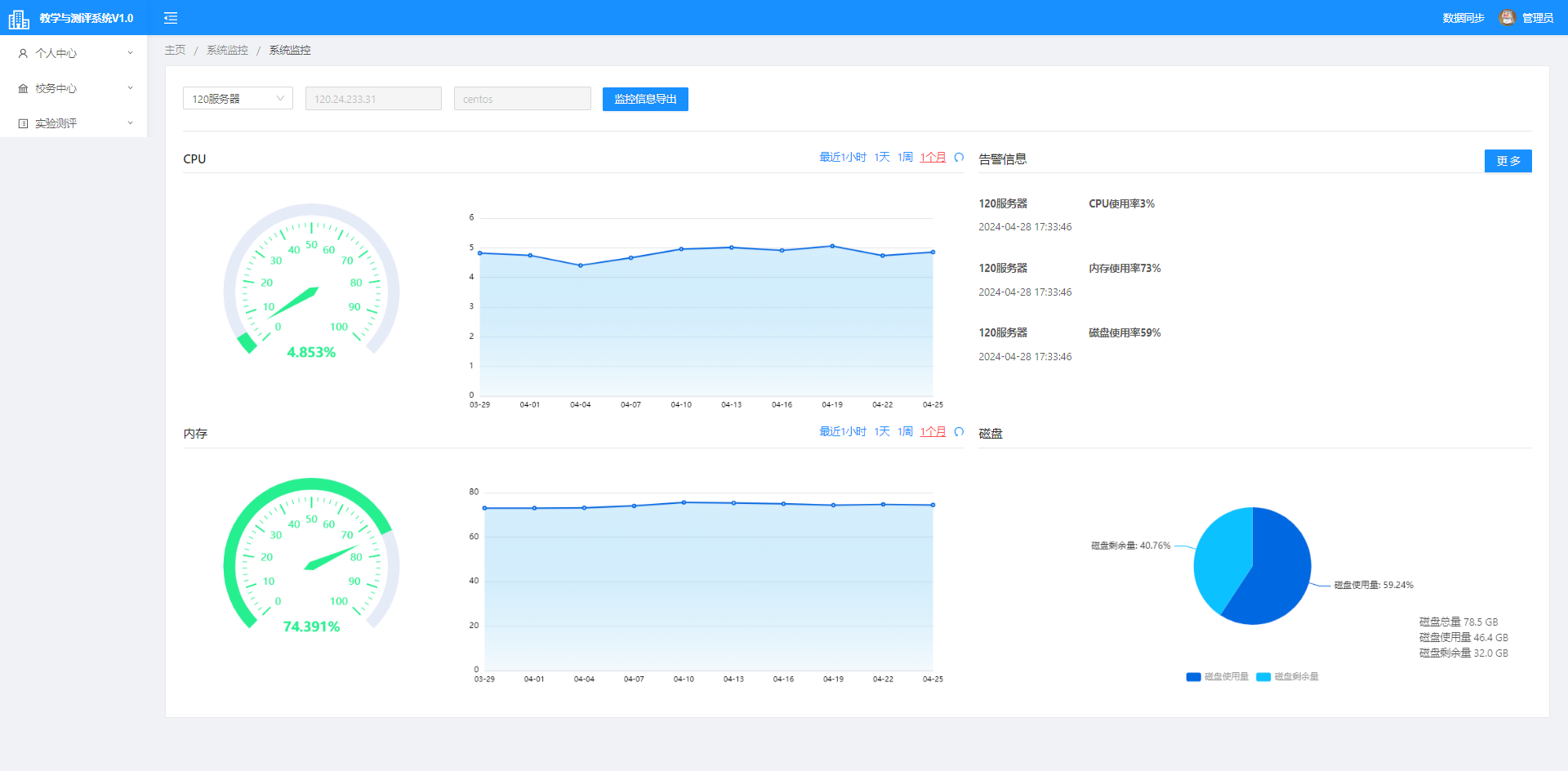
例子3:内存监控页面
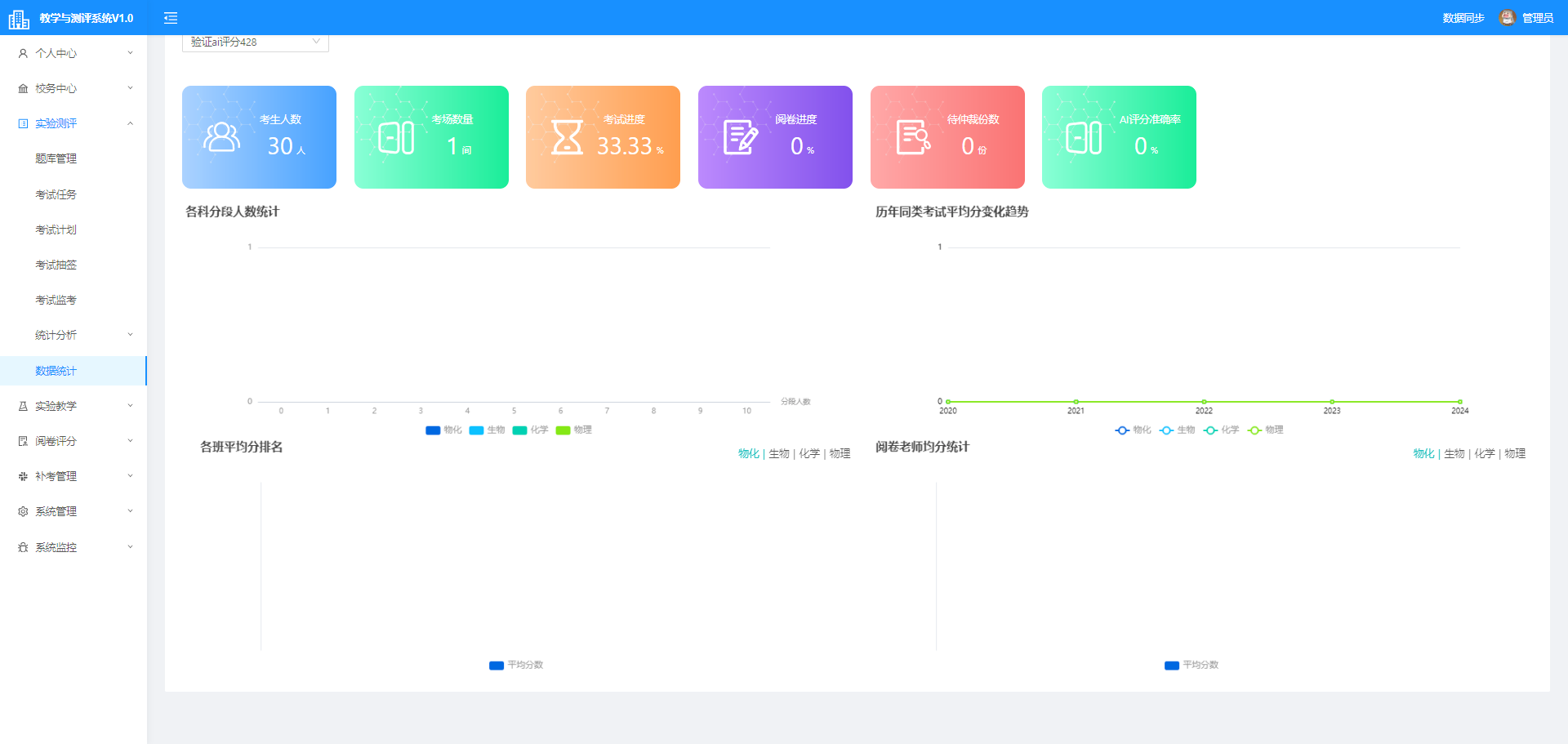
例子4:分数统计
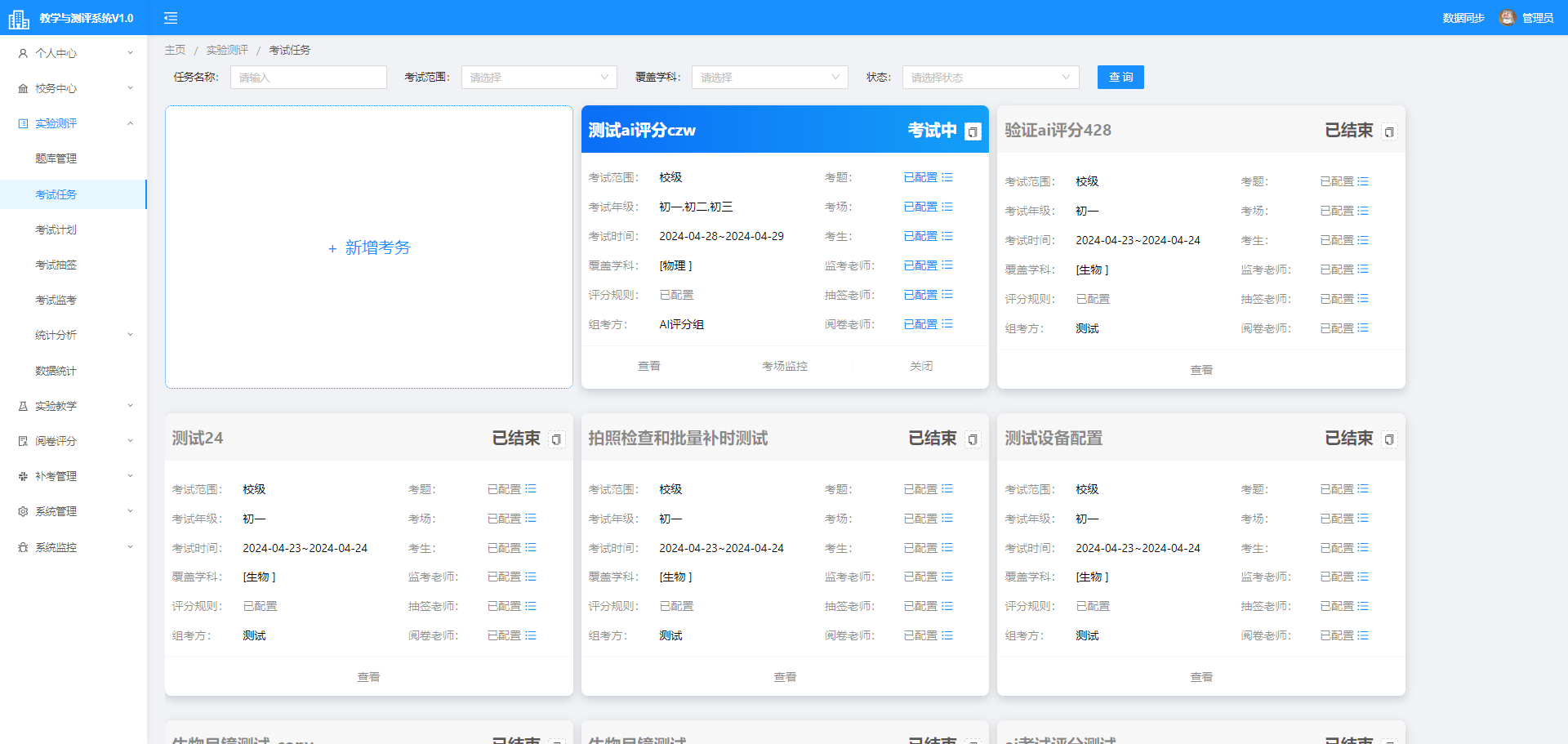
例子5:考试任务下发
五、原理分析
1.视频打点的原理是什么呢?
本质上是从后台获取到的时间点后,在渲染的时候给每一段长度('-data-percent')添加不同的颜色样式,点击的时候调用video的播放按钮跳转到特定的时间点
2.为什么要用this.$ref.set(xxx)
因为object.defineproperty无法监听到对象的添加和删除。所以需要使用这个去动态改变对象。
六、总结
1.主要是使用anti-design框架内部的内容去实现,element-ui或者其他框架同理,主要看文档就可以
2.常用的组件是:下拉框、输入框、表格、查询、文件下载、文件导入,项目功能本质是通过路由在这些组件之间反复嵌套和使用
3.ruoyi开发流程分析:
flowchart TB;
    A[获取需求并进行需求分析] --> C[配置页面路由]
    C --> E[框架文档或者源代码寻找同类型的实现]
    E --> F[引入对应组件]
    F --> G[修改相关配置]
    G --> H[编写数据的处理逻辑]
    H --> I[增加后端接口并联调]
    I --> K[自测后编译测试版本给LIT/SIT测试]
    K --> M[修改bug并自测]
    M --> N[上线]
    N --> A